02. Rules and Help
Public rules, FAQ, and troubleshooting. Rules pages are staff-controlled.
Rules for the Server
You can access these in-game by typing the following command in the chat.
/rules- Be kind.
- No AFK farms, cheating, griefing, or theft.
- No talk of religion, politics, self-harm
- No promoting non-partner servers, including inviting players to other games and servers
- Use English only for moderation purposes
- No adult-themed builds, behaviors, or chats
- Using alt accounts for gain will get you ban
- Never give out personal location (including ages and addresses)
Troubleshooting
Horse Troubleshooting and FAQ
This page covers common ModN Equine questions and problems.
How do I get my horse back when it dissapears?
Use one of the following:
/h
/h panel
This opens the horse panel, which is the main place to manage horses.
Why can I not ride this horse?
Common reasons include:
- you do not own the horse
- you do not have ride access
- the horse is too young
- the horse is an adopted foal that has not matured
- the horse is too small to ride
- the horse is exhausted
- the horse is badly injured
- the horse is listed on the market
Why does right-clicking a horse open the market?
The horse may be listed for sale or adoption.
Listed horses can open the market screen instead of allowing normal riding.
Why is bonding not progressing?
Common reasons include:
- you have not groomed the horse today
- you are riding during a race
- you are going faster than the current bonding stage allows
- a brush check-in is waiting
- you do not have ride access
- you are not riding the horse connected to that bonding path
Open the horse's bonding screen, groom with the ModN Horse Grooming Brush, then follow the current Care & Riding stage.
Why can I not breed my horses?
Common reasons include:
- one horse is not yours
- one horse is despawned
- the pair is not eligible
- the mare has not been fed today
- one horse is too tired
- one horse is listed on the market
- one horse is still on cooldown
- you do not have enough Horse Breeding Potions
Why can I not join a race?
Common reasons include:
- no race is currently open or the join window has closed
- you are not mounted on a Modn Equine horse
- you do not have race permission for that horse
- the horse does not have enough energy to enter
- the horse does not meet Speed or Jump XP requirements
- you do not meet the rank requirement
- you are not holding the required riding crop
- the race is full
Joining closes 10 seconds before the race starts.
Why did I leave a race?
Dismounting leaves the race.
When you leave by dismounting, you are returned to the location where you used /joinrace.
Why was I disqualified from a race?
You may be disqualified if you stop meeting race requirements during the race.
For example, you must keep the required riding crop in your main hand until the race ends.
What is the difference between a Riding Crop and a Pro Riding Crop?
A Riding Crop is the standard riding crop used to make a horse go faster and slower.
A Pro Riding Crop also controls a horse speed but also includes a sprint or burst option after reaching a gallop.
Some races require a specific crop type.
How do I check which horses need feeding?
Use any of these commands:
/h feeding
/h needsfeeding
/h feedstatus
They show persistent-spawn horses that need feeding today.
The feeding day uses UTC.
Why does my adopted foal need milk?
Adopted foals that have been purchased use special care rules.
They must be fed with a bucket of milk each day until they mature.
Why does a custom item look wrong?
Use:
/h updateitems
This updates recognized ModN Equine item textures in your inventory.
Can golden carrots breed ModN Equine horses?
No. ModN Equine breeding uses a custom breeding system and Horse Breeding Potions.
Golden carrots can be used for feeding horses and raising their energy.
Can friends use my horse?
Use:
/h add <horseId> <player>
to add a trusted player, and:
/h kick <horseId> <player>
to remove them.
To allow a player to race your horse, they first must be added. You can then navigate to that horse in /h panel and click friend permissions.
How do I see horses shared with me?
Use:
/h shared
How do I stop being shared on someone else's horse?
Use:
/h leave <horseId>
Where should I report a problem?
If something seems broken or confusing, contact server staff by making a ticket on the discord server or by doing the following command in game.
/ticket create (comment here)To access an in-game ticket you've created, you must know the ticket number and use the following commands.
/ticket view (ticket number)
/ticket comment (ticket number) (comment here)
Useful details to include on your ticket:
- your username
- horse name or ID
- what you were trying to do
- what command or item you used
- any message shown in chat
- where you were in the world
- approximate time it happened
Plot Troubleshooting and FAQ
This page covers common plot questions.
How do I find my plot once I've lost it?
Use one of the following commands in chat:
/plot panel
/plot tp (plot id)
This opens the main plot GUI and includes an option to tp to any plots you are added to.
Why can't I open a chest?
It is sign or plot protected and you need specific permission from the owner to access it.
Why can't I build here?
You may be in spawn or inside someone else's plot without build permission.
If you are in spawn, type one of the following commands to leave
/tpr
/rtp
/wildtp
If you are inside another player's plot, ask the plot owner to check your member permissions. They can add you to the plot with the following command.
/plot add (player username)Why can't I add this player?
Common reasons include:
- you are not standing inside your plot
- the player has not joined the server before
- they are already a member
- you do not have permission to add members
Why can't I set a home or warp here?
You are inside a plot and don't have permission to set one. If you are not inside another player's plot, you may be in a spot deemed "unsafe" such as on blocks with doors, trapdoors, or water.
Why did my claim preview turn red?
The claim overlaps or collides with another plot.
Cancel the preview and try a different location.
How do I cancel a plot claim?
Right-click while the claim preview is active.
Changing hotbar slot, moving inventory items, dropping the item, logging out, dying, or waiting too long can also cancel the preview.
How do I see my plots?
Use:
/plot list
or:
/plot panel
What happens if my plot expires?
You will have to renew it with the correct size claim item before you can interact with anything inside it.
What is the difference between leaving and deleting?
Leaving removes your permissions inside a plot and removes it from your plot panel and turns it into an "available plot".
Deleting removes the plot protection from the land, so nothing is protected.
If you are the owner, leaving abandons the plot but does not refund a claim item. Deleting may refund a claim item if the plot is within the refund window (24 hours).
Commands to do both follow:
/plot leave (plot id)
/plot delete (plot id)
An old claim item says to contact staff. What should I do?
Keep the item safe and contact staff so they can replace it.
The Staff of PCE!
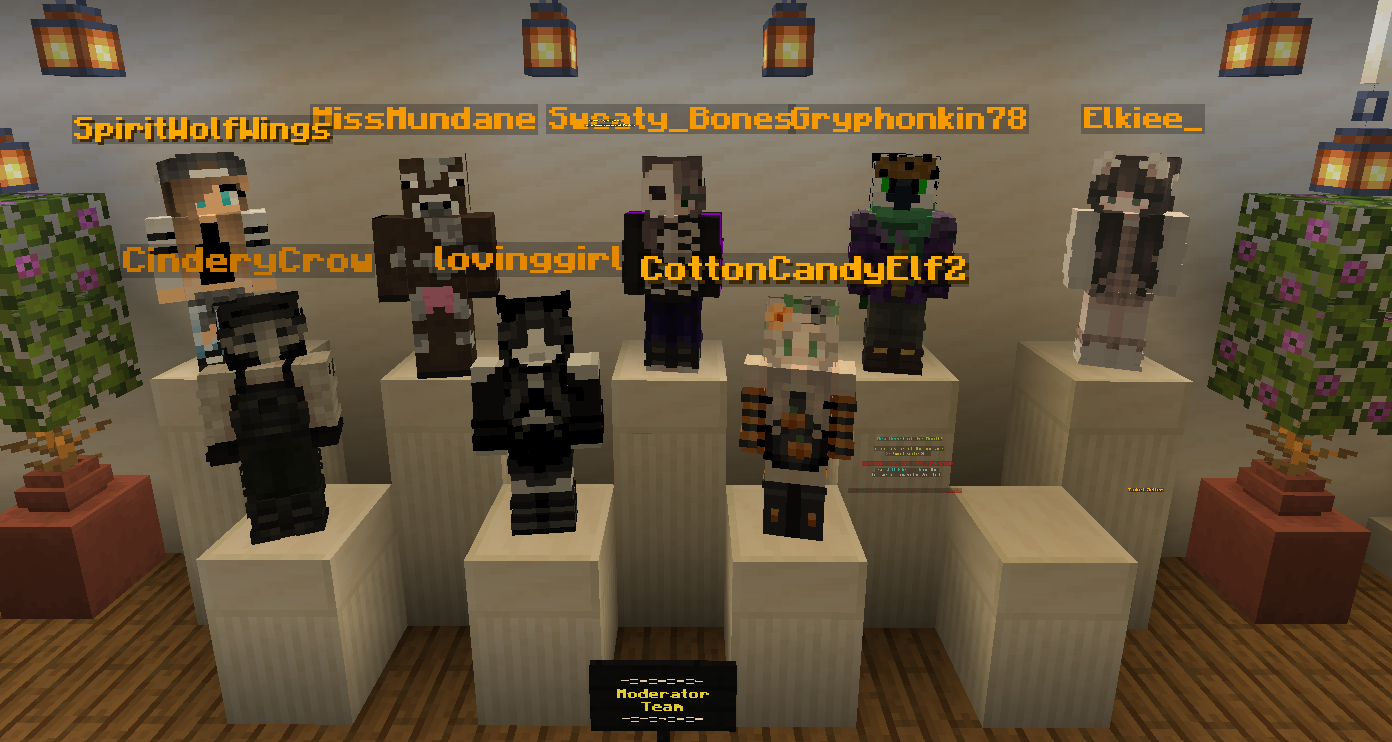
List of Senior Mods:
- Bones
- Mundane
- Spirit
- Gryphon
- Elk
List of Mods:
- Fluffy
- Eevee
- CinderyCrow
Current Council/Mayor:
Mayor: Rooster
Council:
- Fitzy
- Vradow
- Spacefox
- Metta
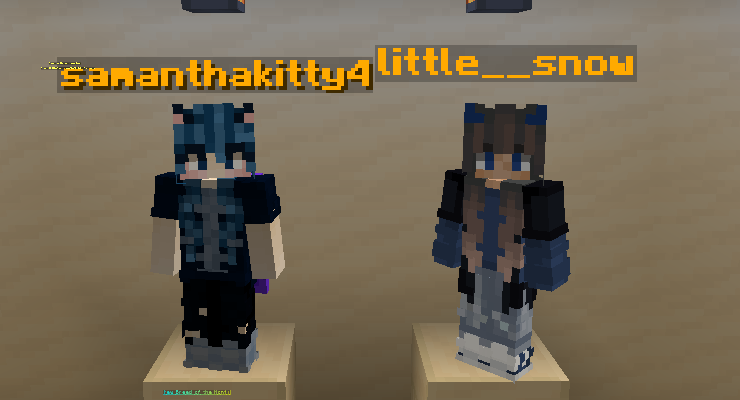
Eventers/Lead Eventers:
Lead Eventers:
- Snow (little__snow)
- Sam (samathakitty4)
Eventers:
- OliveDragen
- Faithgaming13
- .Colic4815
- Ciszej (Cisza)
- GiniRainZ
Common Plugins and their Wikis!
ModN Equine: A ModN-made plugin that is covered on other pages! /h panel and /h help!
Plot Panel: Another ModN-made plugin covered on other pages! /plot panel and /plot help!
mcMMO: This is the plugin gives you powers in your day to day minecraft experience. Examples include insta-chopping trees, temporary haste for mining, avoiding fall damage, and insta-replanting crops. Every time you do a basic task (such as mining a stone block) you get experience displayed in a bar at the top of your screen.
Common mcMMO commands:
/mcmmo help - lists all the commands for mcMMO
/mcstats - lists all mcMMO stats for every skill possible
/(skill here) - tells you all about that skill
/mctop (skill here) - shows you the leaderboard for that skill
List of mcMMO skills:
- Gathering Skills
- excavation
- fishing
- herbalism
- mining
- woodcutting
- Combat Skills
- Archery
- Axes
- Crossbows
- Maces
- Swords
- Spears
- Taming
- Tridents
- Unarmed
- Misc Skills
- Acrobatics
- Alchemy
- Repair
- Salvage
- Smelting