07. Horse Basics
The basics of what you need to know about horses! (Cover picturing Modn riding his horse Frank!)
- Horses / ModN Equine
- Getting Started
- Care and Progression
- Sharing Horses With Friends
- Customizing Your Horse
- Custom Items Reference
Horses / ModN Equine
Horses are at the centre of the Pinecraft Equestrian SMP experience.
Unlike standard Minecraft horses, SMP horses are part of ModN Equine, a custom horse system with ownership, panels, progression, care, bonding, breeding, racing, market listings, custom items, and friend permissions.
The Main Command
Most horse features begin with:
/h
/h panel
/horse panel
Any of these open the horse panel, where you can view your horses, open horse details, access market features, check race options, and manage many horse systems without remembering every command.
What You Can Do With Your Horses
As you play on the SMP, you can:
- choose your first horse
- manage your stable through the horse panel
- feed horses to keep them happy
- share horses with trusted friends
- build a bond through grooming and riding
- breed eligible horses and raise their foals
- list horses or foals on the market or run an auction
- race horses on several different tracks
- use ModN Equine items such as riding crops, breeding potions, healing items, XP boosts, customisation tokens, and race ribbons
Your horse is more than a mount. It is part of your long-term SMP progression, your stable, your breeding plans, your racing journey, and your story on Pinecraft Equestrian.
Getting Started
What Makes ModN Equine Different
Horses on the SMP are not normal vanilla Minecraft horses. Vanilla horses will not spawn naturally in the world.
All horses on the server are part of ModN Equine, a custom horse system built for Pinecraft Equestrian. This means horses are tracked, owned, cared for, progressed, shared, raced, bred, and traded through server systems rather than only through vanilla Minecraft behaviour.
Custom Ownership
Each ModN Equine horse belongs to a player.
Ownership affects who can:
- ride the horse
- rename it
- manage it in the horse panel
- share it with friends
- list it on the market
- breed it
- customise it
Owners must allow other players to do these actions through /h panel and commands.
The Horse Panel
The main way to manage your horses is:
/h
/h panel
/horse panel
These all open the horse panel. From there, you can view your stable, open horse details, access the market, check racing options, and manage many horse features.
Progression and XP
Horses must be trained to get faster and jump higher. These values are called "Speed XP" and "Jump XP". These stats matter for race eligibility, breeding plans, and worth of each horse.
Energy and Care
Horses have energy and care needs.
Feeding restores energy, and persistent-spawn horses need daily attention. Tired or neglected horses may not be ready for demanding activities such as racing or breeding.
Bonding
Players can build a personal bond with individual horses through care and riding. Use a brush to begin this process.
Any player added to a horse can form a bond with the horse, separate from other players.
Breeding and Foals
Breeding uses ModN Equine systems rather than vanilla breeding.
To breed, you must have two "breeding potions". Navigate to your /h panel to begin the breeding.
Racing
A race may require certain Speed XP, Jump XP, energy, rank, and riding crop type. Riders must keep the required crop in their main hand during the race.
Market Listings
Horses and foals can be listed through the horse market.
Listed horses behave differently from normal active horses. Interacting with a listed horse will open the market listing instead of letting you ride it.
Custom Items
ModN Equine includes custom items such as:
- riding crops
- Pro riding crops
- breeding potions
- customisation tokens (breed, coat, and gender)
- XP boosts (speed and jump)
- healing items
- invulnerability shards
- race ribbons
- grooming brushes
These items are part of the horse system and may not behave like ordinary vanilla items.
Player-Friendly Rule
When in doubt, open:
/h panel
The horse panel is the safest starting point for almost every horse action.
Getting Your First Horse
Getting your first horse is one of the most important moments in your SMP journey.
On Pinecraft Equestrian, horses are part of ModN Equine. They are not normal Minecraft horses, and your first horse is created through the server's custom horse system.
Choosing Your First Horse at Pineton Stables
At the end of the SMP tutorial, you will visit Pineton Stables, where you get to choose your first horse.
You will be shown a breed selection menu. This menu lets you choose the breed of your first horse before it is created for you.
Choosing a Breed
From the breed selection menu, you can choose the breed of your first horse.
For your very first horse:
- only mountable breeds are available
- smaller miniature breeds unlock later, once you already own at least one horse you can ride
Once you choose a breed, your horse is created and spawned for you.
Your First Command
After receiving your horse, open the horse panel with one of the following:
/h
/h panel
/horse panel
This is the main place to view and manage your horse. You can spawn and despawn, breed, sell, bond, and customize your horse inside this menu.
To spawn your horse, go into /h panel. Click the saddle, the concrete block, and then the red concrete block at the top. Once it turns green, the horse will spawn in. It will despawn when you disconnect from the server. To keep a horse spawned in while you are offline, click the concrete again so it is yellow. When yellow, that horse is considered in "persistent spawn".
Training Your Horse
Horses can become faster and jump higher through training. In order to do so, hold a crop in your hand and mount your horse. Clicking the crop and smacking with the crop will affect its speed. As you gain experience, the values at the top of the screen will get higher. The crop is displayed below.

You can also use "speed boosts" and "jump boosts" to raise a horse's speed and jump values. These items are displayed below.

Feeding Your Horse
You can use many items to keep your horses full and happy. If a horse is set to persistent spawn, they will need fed once daily to stay out. You can use wheat, haybales, apples, golden apples, enchanted golden apples, carrots, golden carrots, and sugar to feed a horse. Any player can feed your horse.
Renaming Your Horse and Adding Other Players
To rename your horse, use the following command in chat.
/h rename (Name here)
/h rename (horse id) (Name here)
The first command must be used only when you are mounted on the horse.
The second command can be used anywhere. You can find a horse's id by shift clicking on them or by finding them in your /h panel.
/h add (horse id) (player username)To add a player to your horse, to the command above. The player does not have to be online to be added. This allows a player to ride and lead your horse. To allow a player to enter a race with your horse, you will need to navigate to /h panel and set the permission in that menu.
Bonding to Your Horse
Bonding to your horse consists of brushing and riding it to grow closer. As you grow closer, trails will be rewarded to make riding your horse more fashionable.
Getting a brush, you can click it on your horse to begin the process. It will give you instructions on how to proceed. You will need to ride the horse after and then brush them. You can do this three times a day.

Above is a picture of a player named Lina brushing her favorite horse Beyond Belief!
The /Horse Panel
The horse panel is the main menu for ModN Equine.
Open it with:
/h
/h panel
/horse panel
Main Panel
The main panel includes these main areas:
- My Horses (a saddle icon)
- Races (a clock icon; coming soon)
- Horse Market (an emerald icon)
- Command Help (a book and quill icon)
- Horse Guide (a book icon)

My Horses
Use My Horses to view and manage the horses in your stable.
This is where you can find your owned horses, check their details, and open each horse's management screen.
The horse list can be sorted in different ways, including by:
- ID
- stats
- breed
- height
- coat
Horse Details
Opening a horse from your "My Horses" section shows that horse's detail panel.
Depending on the horse, this panel may let you:
- view horse information (book icon)
- click on the book to buy a copy of the information for $10,000
- spawn or despawn the horse and extend the spawn to persistent (concrete icon- red, yellow, green)
- open selling options (redstone icon)
- teleport to the horse (enderpearl icon)
- open breeding options (breeding potions icon)
- open bonding options (apple icon)
- open customisation options (smithing table icon)
- manage friend permissions (book and quill icon)

Spawn Controls
The horse detail panel lets you cycle through the horse's spawn state. Click their concrete to toggle this state.
The main states are:
- Despawned (Red Concrete)
- Spawned (Green Concrete)
- Persistent Spawn (Yellow Concrete)
A normal spawned horse is available in the world while the player is online.
A persistent-spawn horse stays spawned even when the player is online. It will need to be fed daily.
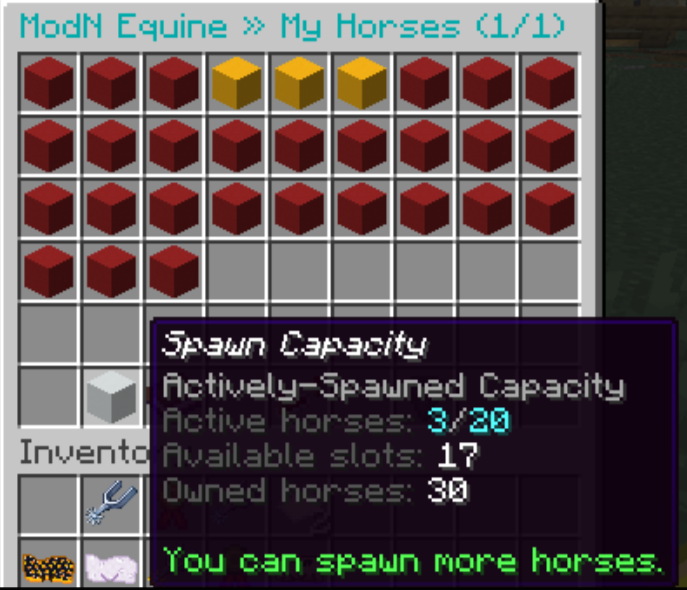
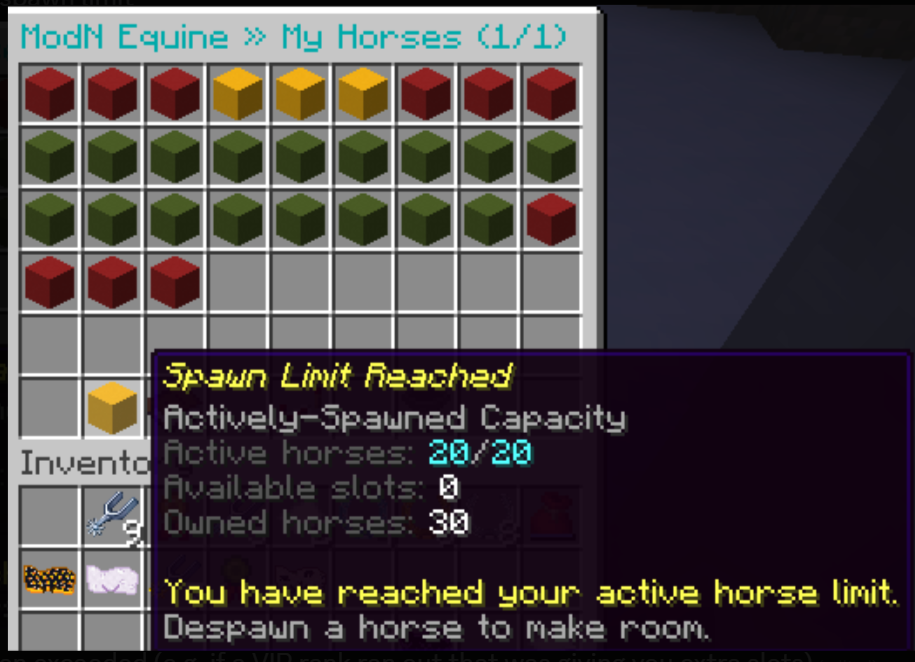
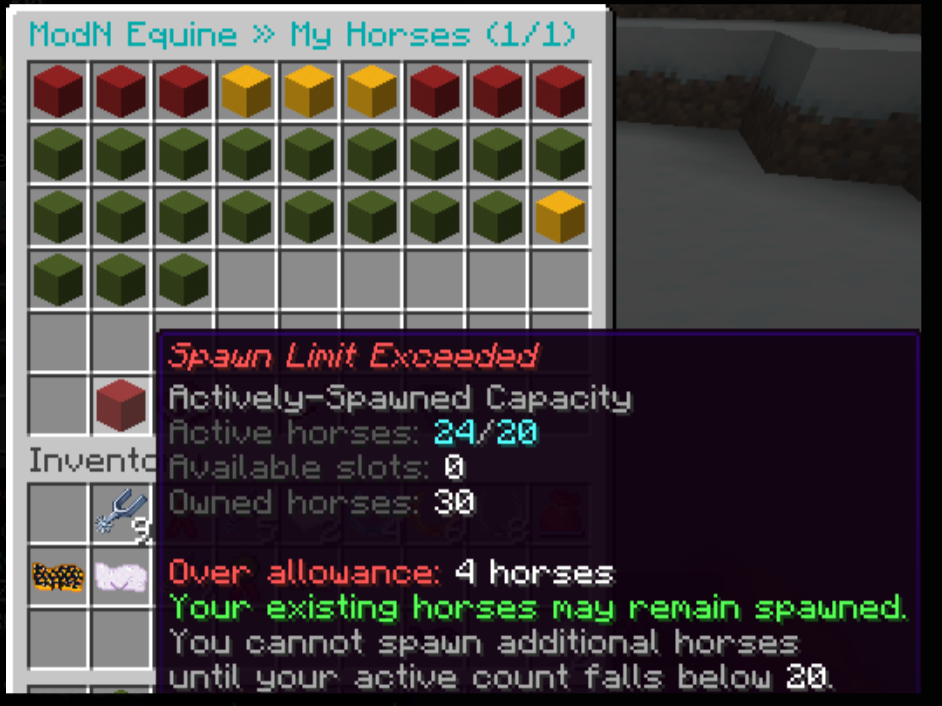
SPAWN CAPACITY: You can only have a certain amount of horses spawn at a time based on your rank. When actioning vips, you gain extra horse slots. You can view this information in your horse panel underneath your list of horses!
The concrete will change color based on how many horses you have. If it is red, this means you are over the limit, most likely from an expired vip.
Horse Market
The Horse Market lets players browse horses for sale or manage their own listings.
From the market you can:
- browse and sort public listings
- inspect listed horses
- tp to a listing to purchase the horse
- manage your own listings (including cancelling it)
If a horse is currently listed on the market, interacting with it in the world may will the market listing instead of letting you ride it.
Races
Races may have entry requirements such as:
- Speed XP
- Jump XP
- energy
- rank
- riding crop type
- race permission for the horse
Each race will list its requirements in chat. To race, you need to be mounted on the horse and holding a crop item while an upcoming race is open in chat. To join, type the following command.
/joinraceTo leave at the end of a race, dismount your horse.
Race warnings in chat look like the following picture, but may vary in color and instructions.

Horse Commands
Main Commands
| Command | What it does |
|---|---|
|
Opens the horse panel |
/h help |
Shows the command list in-game |
/h guide |
Shows an in-game horse care guide |
/h rename <new name> |
Renames the horse you are currently mounted on |
/h rename <horseId> <new name> |
Renames one of your horses by ID |
/h updateitems |
Updates ModN Equine item visuals in your inventory |
Sharing Commands
These commands let you share ride access with other players.
| Command | What it does |
|---|---|
/h add <horseId> <player> |
Adds a player to one of your horses |
/h kick <horseId> <player> |
Removes a player from one of your horses |
/h friends <horseId> |
Shows who has access to a horse |
/h shared [page] |
Lists horses that other players have shared with you |
/h leave <horseId> |
Removes yourself from another player's shared horse |
Feeding Commands
Persistent-spawn horses need regular care. These commands show persistent horses that still need feeding today:
/h feeding
/h needsfeeding
/h feedstatusAll three commands do the same thing.
The feeding check uses the UTC day, so the in-game care boundary may not match your local timezone.
The list can include:
- persistent-spawn horses you own
- persistent-spawn horses you can ride because another player shared them with you
Care and Progression
Horse Stats and Progression
Horses on Pinecraft Equestrian develop over time.
They are not static mounts. Riding, jumping, care, race preparation, breeding plans, and market decisions all depend on understanding a horse's stats.
Where To View Stats
Open the horse panel with:
/h
/h panel
/horse panelThen click on the saddle icon (My Horses) and choose a horse.
The details shown when hovering over the horse include:
- horse ID
- name
- breed
- sex
- coat or pattern
- height
- health
- energy
- Speed XP
- Jump XP
- parent information
- date of birth or creation details
- spawn state
- feeding status
Speed XP and Jump XP
Two of the progression values are:
- Speed XP (how fast a horse can go)
- Jump XP (how high a horse can jump)
You can watch these levels increase at the top of your screen while riding your horse or using jump or speed boosts.
Races may require a specific range of xp in both of these categories.
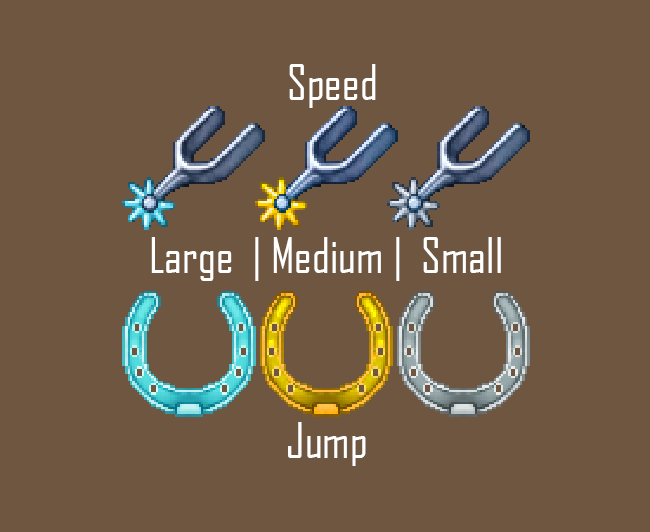
(Speed Boosts have a unique texture drawn by MissMundane!)
Race Eligibility
Races can have entry requirements based on Speed XP and Jump XP.
Some races are designed for newer horses. Others are aimed at more developed and experienced horses.
A horse can be too inexperienced for one race and too advanced for another if the race has both minimum and maximum XP requirements.
- Rookie: 1.00-1.50
- Remember not to use a speed or jump boost on a base horse or that horse will be ineligible for this race!!
- Breeding Cup: 2.50-4.00
- Open Class: no requirements
- Advanced: 1.51-2.50
Energy
A horse may be blocked from riding, racing, or breeding if it is exhausted/low on energy.
You can feed a horse the following foods to give it the corresponding energy amounts.
- Wheat : 7.0
- Haybales : 22.0
- Golden Carrots : 12.0
- Carrots : 10
- Enchanted Golden Apples : 100
- Golden Apples : 35
- Apples : 10.0
- Sugar : 4.0
You must feed adopted foals milk buckets!
To check which horses need feeding, do one of the following commands.
/h feeding
/h needsfeeding
/h feedstatus
All three commands do the same thing.
The feeding day uses UTC, so it may not match your local timezone.
Health
A horse may be blocked from riding, racing, or breeding if it is badly hurt.
You can heal a horse by leaving it spawned or by click on it with equine wound treatment (25% heal), veterinary dressing (50% heal), and divine equine ambrosia (100% heal). All of these can be found at /warp vetclinic. You can also use a shard of equine invulnerability to keep a horse invulnerable for 24 real life hours.
Breeding Potential
Progression can matter when thinking about breeding.
Foals have traits from their parents. An average of the speed and jump values is given to the foal. (For example, if the mare has a 1.50 speed and the stallion has a 2.00 speed, then the foal will have a 1.75 speed value when born.)
Bonding With Your Horse
Bonding is a personal connection between you and a ModN Equine horse.
Each player has their own bond with each horse. A horse can belong to one player, but another trusted player can build their own bond if they have ride access.
Opening the Bonding Hub
Open the horse panel with:
/h
/h panel
/horse panel
Then click on the saddle icon (My Horses), choose a horse, and look for the bonding option (apple icon) in that horse's detail panel.
The bonding screen includes:
- Bond points (experience bottle)
- Bond level (nether star)
- Daily bonding progress (concrete block)
- Care/Riding Path (to see cosmetics; saddle)

Daily Bonding Steps:
- Grooming is the first step in bonding. To groom, use a ModN Horse Grooming Brush on a horse you can interact with.
- You can purchase one at /warp tackshop!
- Ride your horse in the first stage. After each stage, you'll need to re-brush your horse.
| Stage | Riding pace |
|---|---|
| Warm-Up Ride | Walk or Trot only |
| Trail Ride | Canter or slower |
| Endurance Ride | Any gait |
Going faster than the current stage allows pauses bonding distance for that stage. It does not cancel the ride or erase the distance you already earned.
Races do not count for bonding progress.
Bonding Rewards
As your bond grows, rewards can unlock.
The saddle icon shows what a reward does and whether it can be activated. Cosmetic rewards can be activated or deactivated from the reward screen.
Mounted cosmetic effects only display while you are riding the horse.
Why Bonding Might Not Progress
Common reasons include:
- you have not groomed the horse today
- you are riding during a race
- you are going faster than the current riding stage allows
- a brush check-in is waiting
- you do not have ride access
- you are not riding the horse connected to that bonding path
Sharing Horses With Friends
ModN Equine lets you share horse access with trusted players.
Sharing is useful if you want a friend to ride, care for, feed, groom, or help with a horse.
Adding a Friend
To add a player to one of your horses, use:
/h add <horseId> <player>
Example:
/h add 42 Alex
This grants access through ModN Equine permissions.
Removing a Friend
To remove a player from one of your horses, use:
/h kick <horseId> <player>
Example:
/h kick 42 Alex
Viewing Horse Friends
To see who has access to a horse, use:
/h friends <horseId>
Viewing Horses Shared With You
To see horses that other players have shared with you, use:
/h shared
You can also use pages:
/h shared 2
Leaving a Shared Horse
/h leave <horseId>
This removes yourself from that horse's shared access list.
Race Access
To allow a player to race a horse they are added to, navigate to /h panel, click on the horse, click friend permissions (book and quill icon), and set their racing permissions.
What Friends Cannot Do
Sharing a horse does not make the other player the owner.
Customizing Your Horse
ModN Equine includes customisation systems for changing certain horse details.
Customisation is handled through the horse panel and usually requires special customisation tokens.
Open the horse panel with:
/h
/h panel
/horse panel
Then open the horse you want to customize. Click the smithing table icon while holding a token.
Remember the horse you want to customize must be de-spawned! This means foals and pregnant mares cannot be customized.
Breed Customization Token
Can be purchased from /shop or other players.
Sex Customization
Sex customization can change whether a horse is treated as male or female by the system.
Coat Customization
Coat customization can change the horse's coat pattern and color.
Forever Foal Growth Token
This token can make an adult horse show as a foal permanently. You must use another token to revert this decision!
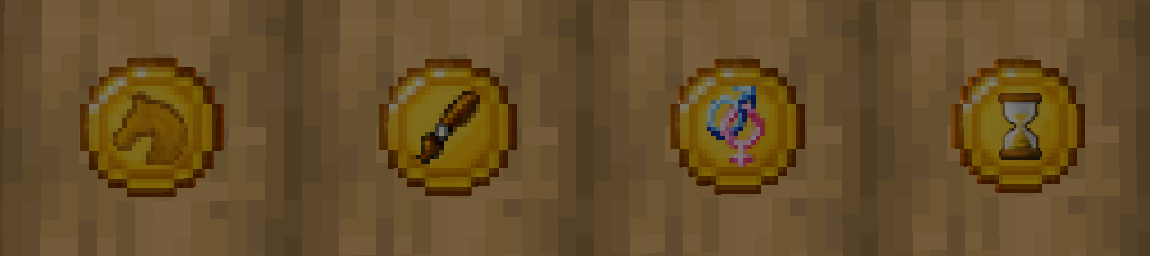
The picture above shows the customization tokens in the following order from left to right: Breed, Coat, Gender, Forever Foal.
Before You Customize
Before using a token, check:
- you are customizing the correct horse
- you have the correct token
- the horse is eligible (de-spawned and fully grown)
- the change supports your long-term plans
If an Item Looks Wrong
If a customization token or other ModN Equine item has outdated visuals, use:
/h updateitems
This updates recognized ModN Equine items in your inventory.
Custom Items Reference
| Item | How players use it |
|---|---|
| Feed items | Use directly on an eligible horse |
| XP boosts | Use directly on an eligible horse |
| Healing items | Use directly on an eligible horse |
| Invulnerability shards | Use directly on an eligible horse |
| Riding Crop | Use while mounted |
| Pro Riding Crop | Use while mounted, with advanced sprint/burst behaviour |
| Grooming Brush | Use through the grooming and bonding flow |
| Horse Breeding Potions | Use through the breeding system |
| Customisation Tokens | Use through the customisation screens |
| Race ribbons | Keep as racing rewards or display items |