Shop Signs
Setting up the Shop:
You will need the following items:
- A sign
- A single redstone dust
- A container (chest or barrel)
- The items you want to sell
Extra Notes
- The sign does not have to be on the chest to link the two
- You can feed a hopper into the chest to automatically fill the chest
Setting up a [buy] Shop Sign:
Players who click on this sign will give you money in return for taking items from you.
- Place down a sign
- (If placing on the container itself, shift and place so it does not turn into a permissions sign.)
- (You can place a permissions sign on any other surface of the same chest)
- The top/first line of the sign must say [buy]
- The second and third line may have anything you wish. (Most people put the item and amount of item on these lines)
- The last/fourth line must have the amount of money people will pay for this item
Example: 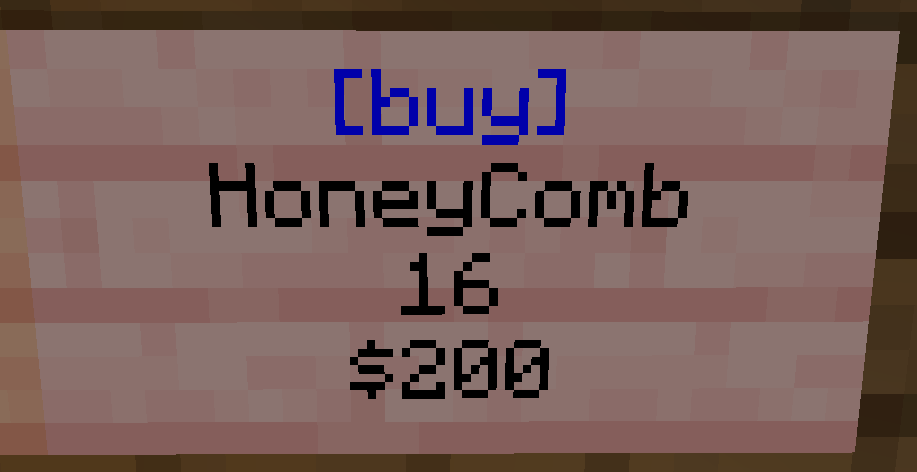
This shop sign from /pw TheCoop shows a listing for 16 honeycombs for the cost of $200. The "$" is optional.
Setting up a [sell] Shop Sign:
Players who click on this sign will give you items in return for taking money from you.
- Place down a sign
- The first/top line of the sign must say [sell]
- The second and third line may say anything you wish. (Most people put the item and amount of item on these lines)
- The fourth/last line must have the amount you will pay players for the items.
Example: 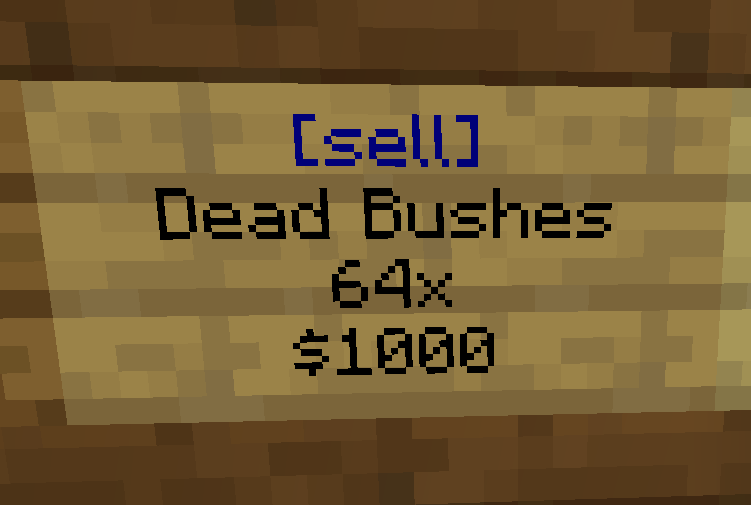
This shop sign from /pw TheCoop shows a listing for players to give a stack of Dead Bushes to gain $1000 from the owner.
The "$" is optional.
Linking a Shop Sign to the Chest of Items:
This is how you will stock the shop.
- Place down a chest or barrel. It does not have to be physically connected to the sign.
- Place one listing's worth of items in the chest. (Do NOT fill the chest. If the listing is for 16 rose bushes, only put 16 rose bushes in the chest)
- Grab your redstone dust and smack the chest as if hitting it.
- (Bedrock players may need to hold down on the screen for a couple seconds)
- (It should say "Stored Location of Chest..." if successful)
- Smack the sell sign with the redstone dust. (If successful, the [buy] line will turn blue.)
- You may now fully fill the chest with as many wares as you want.
Restocking the Shop:
For when the chest is empty and/or the sign's [buy] or [sell] line has turned from blue to red.
The red color means the shop does not have enough stock to make a purchase from. To restock, simply fill the chest. Then right-click the sign to change the color back to blue. You can also left click the sign, but this will withdraw a selling's worth of items from the chest.
Right clicking the sign at any time will tell you how many items are left in the chest linked to the sign
Items must match the original listing exactly. Any named items must be named exactly the same.
To reset a Shop, simply break and replace the sign.